Home | Projects | Notes > Computer Architecture & Organization > ARM Register Set
ARM Register Set
ARM Register Set
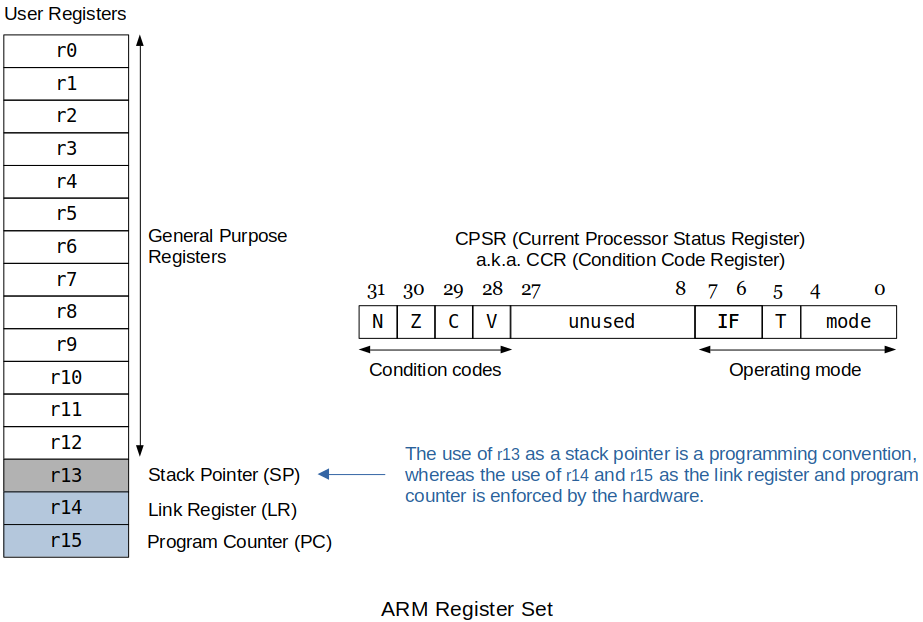
ARM has 16 programmer-visible registers and a Current Program Status Register, CPSR.
xxxxxxxxxx81r0 - r12 : General-purpose registers2(r0 - r11 are completely interchangeable.3r12, a.k.a. scratch register, is used for Intra-Procedure-call.)4r13 : Reserved for the programmer to use it as the stack pointer5r14 : Link register which stores a subroutine return address6(This is what the BL instruction uses to store the current PC.)7r15 : Program counter which is accessible by the programmer8CPSR : a.k.a. CCR, holds the processor status and control informationMore on Current Program Status Register (CPSR) (For more details on "condition flags setting", see Introduction to the Stored Program Machine & ARM.)
[31-28] Condition Codes
xxxxxxxxxx41N : Negative or less than flag2Z : Zero flag3C : Carry or borrow or extended flag4V : Overflow flag[27- 9] Reserved
[ 8- 0] System Control Bits
xxxxxxxxxx121IF : Enables or disables IRQ or FIQ interrupts2T : Thumb mode3Mode :4M[4:0] Mode ARM - Visible State Registers5------ ---------- --------------------------------------------6b10000 User r0-r14, PC, CPSR7b10001 FIQ r0-r7, r8_fiq-r14_fiq, PC CPSR, SPSR_fiq8b10010 IRQ r0-r12, r13_irq, r14_irq, PC CPSR, SPSR_irq9b10011 Supervisor r0-r12, r13_svc, r14_svc, PC CPSR, SPSR_svc10b10111 Abort r0-r12, r13_abt, r14_abt, PC, CPSR, SPSR_abt11b11011 Undefined r0-r12, r13_und, r14_und, PC, CPSR, SPSR_und12b11111 System r0-r14, PC, CPSRSo far, we have discussed only these 17 registers that are visible to us in the user mode. In reality, however, ARM has total 32 registers and the rest become visible as you switch to the different modes.
ARM designers decided to maintain another set of registers to make context switching more efficient by reducing the push/pop of all the registers to/from the stack.
ARM has some four operand instructions. This is possible due to only having 16 registers so only 4 bits are needed to specify the register. (Out of 32 bits, 16 bits are still available for the instruction and addressing modes after using 16 bits to specify four operand registers.)
xxxxxxxxxx91ADD r1, r2, r3 @ Three operands2@ RTL: [r1] ← [r2] + [r3]3@4@ At times, one of these three can be left out.5@ ADD r1, r26@ RTL: [r1] ← [r2]78MLA r1, r2, r3, r4 @ Four operands (MLA: Multiply Accumulate)9@ RTL: [r1] ← [r2] * [r3] + [r4]Not all supports four operands. Refer to the "ARM Instruction Set" manual.
Things to Note with the Raspberry Pi and the C Library Routines
When a call is made to routines like printf, scanf, etc. the values in registers
r0 - r3andr12will be used by the called routine. Whatever values you had stored there will be overwritten. So, save the register values on the stack if this wipe-out is expected.xxxxxxxxxx361push { /* list of registers*/ } @ Save register values on the stack2e.g., push {r0, r1, r2, r3}3push {r0-r15}4push {r2, r0}5pop { /* list of registers*/ } @ Restore original values into the regs6e.g., pop {r0, r1, r2, r3}7pop {r0-r15}8pop {r2, r0}910[!] Note: The order of the list of registers when pushing does not matter11since each register is mapped to the bits in the data transfer12instruction.13However, the order in pop should match that of push's.14Otherwise, the restored value can be mixed up.15(ARM assembler won't report this as an error.)1617e.g., CORRECT!18push {r2, r3, r4}19pop {r2, r3, r4} @ Move top of the stack into r4 first,20@ then r3, then r221WRONG!22push {r2, r3, r4}23pop {r3} @24pop {r4} @ This mixes up the resotred values!25pop {r2} @262728[!] Note: The push puts the data on the stack from the lowest number register29to the highest number register. The pop pulls them off the stack30from the highest number register to the lowest number.3132[!] Note: Be careful NOT to,33"push {r2, r3, r4}" then try and restore by34"pop {r3}, pop {r4}, pop {r2}" since this will switch values35between the registers.36You should be using "pop {r2, r3, r4}"Depending on the type of call, sometimes other registers may be used as well. Be aware of that!
Comments on
.global printfin the following program supports this. Refresh yourself!xxxxxxxxxx1031@------------------------------------------------------------------------2@ File Name : lab04.s3@ Description : ARM assembly program to calculate factorials.4@ Author : Kyungjae Lee5@ UAH Email : kl0079@uah.edu6@ Course : CS309-01 Spring 20227@------------------------------------------------------------------------89.text1011.global main1213main:1415@ Prompt the user to enter a number.1617ldr r0, =askForNumber18bl printf1920@ Read in the number.2122ldr r0, =formatSpecifier23ldr r1, =intInput2425bl scanf26ldr r1, =intInput27ldr r1, [r1]2829@ If the input value is not 1-12, terminate the program.3031cmp r1, #132blt myexit3334cmp r1, #1235bgt myexit3637@ Confirm the user of the entered number if the number is valid.3839ldr r0, =confirmNumber40bl printf4142ldr r1, =intInput @ r1-r3 value changes when printf is invoked43ldr r1, [r1] @ so load the input valu again!4445@ Manipulate the registers to calculate factorials and print them.4647mov r8, r1 @ r8 will be used to hold copy of the user input.48mov r4, #1 @ Initialize r4 which will be used as 1st col num.49mov r5, #1 @ Initialize r5 which will be used as 2nd col num.50mov r6, #1 @ r6 will be used to hold r5's previous value.5152@ Loop to calculate and print the factorials.5354loop:55cmp r4, r8 @ break if r4 gets bigger than the user input.56bgt myexit @ terminate the program.5758mul r5, r4, r65960mov r1, r4 @ Pass r4 value to printf via r161mov r2, r5 @ Pass r5 value to printf via r26263ldr r0, =calcOutput64bl printf @ Print the intermediate/final calc result.6566mov r6, r5 @ Update r4, r5, r6 for next calculation67add r4, r4, #168add r5, r5, #16970b loop7172myexit:73mov r7, #0x01 @ SVC call to exit74svc 0 @ Make the system call.7576.data7778.balign 479askForNumber: .asciz "Enter a number (1-12): "8081.balign 482confirmNumber: .asciz "You entered %d!\n "8384.balign 485calcOutput: .asciz "%d\t%d\n "8687.balign 488formatSpecifier: .asciz "%d"8990.balign 491intInput: .word 09293.global printf94@ printf("This is printf function, %d %d %d\n", r1, r2 ,r3)95@ -----------------------------------96@ Address of this whole string is stored in 'r0'97@98@ r0-r3 are used as arguments to printf function. When you invoke printf99@ function these register values are likely to be changed. It is a good100@ practice to use other registers than these for the manipulation purposes.101102.global scanf103@ Similar applies to the global scanf function.Output
xxxxxxxxxx141Enter a number (1-12): 122You entered 12!31 142 253 664 2475 12086 72097 5040108 40320119 3628801210 36288001311 399168001412 479001600